
PianoStar2.0.1 - Get APK
You'll be able to download in few seconds.
Publisher Description
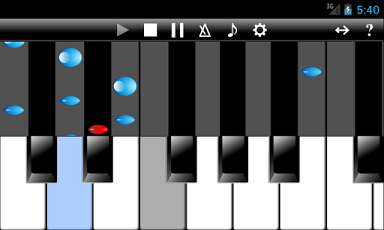
It is a keyboard for music to teach the method of performing music like timing and time, etc. to push the keyboard!
Of course, it is possible to perform as a usual keyboard.
The Multi-touch is possible!!
The tone that can be used is as follows.
* 128 tones(Piano, Sax, Guitar, Drum etc.) of General MIDI (GM)
* 61 sounds of percussion of General MIDI (GM)
The octave can do nine phases of adjustment.
The Score-style has the following kinds.
* Conform to tempo
* Awaiting input
In addition, there is an automatic play function.
The thing performed with the keyboard together is possible!
As noted above, can choose various exercise methods.
== More infomation ==
http://skyarts.com/products/android/pianostar/
== Collection musics ==
The collection music is as follows.
* Ode to Joy (Beethoven)
* When The Saints Go Marchin' In
* Menuett (Christian Petzold)
* London Bridge is Falling Down
* Twinkle, Twinkle, Little Star
* Sakura
* Mary Had a Little Lamb
* Londonderry Air
* My Grandfather's Clock
* Wiegenlied (Johannes Brahms)
* Thine is the Glory (Georg Friedrich Handel)
* American Patrol Op.92 (F. W. Meacham)
* Votre toast, je peux vous le rendre (Georges Bizet)
* Melody (Schuman)
* La donna e mobile (Giuseppe Fortunino Francesco Verdi)
* Fur Elise (Beethoven)
* Silent Night
* Jingle Bells
* The Entertainer (Scott Joplin)
* Triumphal March "Aida" (Giuseppe Fortunino Francesco Verdi)
Note: Each music is arranged a little.
Music can be expanded by putting the Standard MIDI file(.mid) in the SD card!
== Method of adding music ==
To use the MIDI file in the SD card on the play screen, MIDI file is put on the "/sdcard/skyarts.com/PianoStar/musics" directory first.
However, there is the following conditions in the MIDI file that can be
used.
* Standard MIDI version 1
* The data consist of Header, Conductor Track, Play Track.
* As for Play Track, only the first Track is effective.
* Harmony is improper.
* The octave : only by one octave.It is treated automatically as one
when there are plurals.
* The tempo change in the middle of the music is non-support.
* The extension of the file is ".mld".
== About the license certification ==
For illegal copy prevention, work connect to the server at the time of first start and license it, and to authenticate it.
The following things are thought about when error "999" appears at the time of the license certification.
* Because communication facility becomes invalid, certification processing is not possible.
-> Please validate communication facility. It is OK in WiFi.
* Because "market" application gives an error, certification processing is not possible.
-> May be recovered when you uninstall update of the (Android) "Market" application.
-> When the password of "Accounts & sync" of the setting window is not input or disappear, it occurs.
When you hold "Accounts & sync" of the setting window, and it is demanded password input, it is thought that it is caused by this.
About PianoStar
The company that develops PianoStar is SkyArts.com. The latest version released by its developer is 2.0.1.
To install PianoStar on your Android device, just click the green Continue To App button above to start the installation process. The app is listed on our website since 2013-07-13 and was downloaded 0 times. We have already checked if the download link is safe, however for your own protection we recommend that you scan the downloaded app with your antivirus. Your antivirus may detect the PianoStar as malware as malware if the download link to com.skyarts.android.pianostar is broken.
How to install PianoStar on your Android device:
- Click on the Continue To App button on our website. This will redirect you to Google Play.
- Once the PianoStar is shown in the Google Play listing of your Android device, you can start its download and installation. Tap on the Install button located below the search bar and to the right of the app icon.
- A pop-up window with the permissions required by PianoStar will be shown. Click on Accept to continue the process.
- PianoStar will be downloaded onto your device, displaying a progress. Once the download completes, the installation will start and you'll get a notification after the installation is finished.
Program Details
System requirements
Download information
Pricing
Version History
version 2.0.1
posted on 2013-07-13
Has been deleted the title screen.,Added the ability to adjust the width of the keyboard.,Changed the design.
version 2.0.1
posted on 2012-03-27
Several fixes and updates
Disclaimer
External Download
We do not host PianoStar on our servers. We did not scan it for viruses, adware, spyware or other type of malware. This app is hosted by Galad and passed their terms and conditions to be listed there. We recommend caution when installing it.
The APK Download link for PianoStar is provided to you by apps112.com without any warranties, representations or guarantees of any kind, so access it at your own risk.
If you have questions regarding this particular app contact the publisher directly. For questions about the functionalities of apps112.com contact us.
